Showing posts with label SQL. Show all posts

SQL SSRS Report Subscriptions Architect

at

Summary
This letter describes the architecture for the SSRS Report Subscription, including:
1. Its database and tables for storing the subscriptions information, and
2. The approach for triggering and rendering the subscriptions


Details
SSRS has two databases -- primary one named SSRSReports and an other working database named SSRSReortsTemp.  the subscription data is spread among the tables of Subscription, Reports, and Events in the SSRSRreports database.


Tables Schema


Triggering the Subscription Schedule Report
Subscriptions are triggered by scheduled SQL jobs. These jobs can be found along with SQL jobs defined by users in the job section using the SSMS.
Such a job is ceated for each report subscription when the subscription was created.  These jobs are named using the subscriptions' GUID and scheduled according to the subscriptions' schedule. See highlighted samples below.
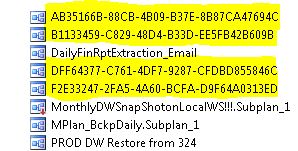
Once a job is triggered by SQL job agent, it enters a "TimedSubscription" event into the Event table. SQL agent checks the table every 10 seconds to pickup the new event and renders the report.

Script to manually run report subscription

at
Summary
This note describes how to manually run the SSRS report subscription. This can be applied when
- Test if the subscription work when setting up the subscription
- Manually run subscriptions in case of failure.

Details
Running a report subscription is an "Event" in the SSRS server. Therefore, manually running a subscription can be as simple as adding an event into the SSRS database and this can be done via the script below on your SSRS database.

EXEC AddEvent @EventType='TimedSubscription', @EventData='[YourReportSubscriptionID]'

Note: the SSRS database name usually in the format of 'ReportServer' then '$' and then the instance name

To automate the script further for re-runing failed subscriptions, you can fetch the subscriptionID that has a failed last run status (laststatus = 'Thread was being aborted.') from the Subscriptions table, then build the addEvent script onfly. Below is a sample of completed script.

DECLARE @strSQL AS NVARCHAR(MAX)

SET @strSQL = ''

SELECT @strSQL = 'EXEC AddEvent @EventType=''TimedSubscription'', @EventData=''' + CAST(SUBSCRIPTIONID AS NVARCHAR(MAX)) + ''' ' + CHAR(13)+CHAR(10) + 'GO' + + CHAR(13)+CHAR(10) + @strSQL
FROM SUBSCRIPTIONS
WHERE laststatus = 'Thread was being aborted.'

EXEC @strSQL


To use the script above, please follow the steps
1. Connect to your SSRS database server via SSMS
2. Connect to the SSRS database (refer to the note above for database name)
3. Click on New Query button on the upper-left screen
4. Copy and paste the script above
5. Click on Execute button to run the script
6. The result should be "1 row effected"
7. It will take about 30 seconds (also depends on how long the report takes to run), then the status should be change on the SSRS subscription screen

The script can also be modified to run the subscription manually for a specific report.  see script below.  NOTE, if the report has more than one subscriptions, all subscriptions will be ran

DECLARE @strSQL AS NVARCHAR(MAX)

SET @strSQL = ''

SELECT @strSQL = 'EXEC AddEvent @EventType=''TimedSubscription'', @EventData=''' + CAST(SUB.SUBSCRIPTIONID AS NVARCHAR(MAX)) + ''' ' + CHAR(13)+CHAR(10) + 'GO' + + CHAR(13)+CHAR(10) + @strSQL

FROM CATALOG RPT

INNER JOIN SUBSCRIPTIONS SUB ON RPT.ITEMID = SUB.REPORT_OID

WHERE NAME = '[YourReportName]'

PRINT @strSQL
 

How to get all triggers text in the DB at once

at
Aim: How to get the text for all delete triggers in the database at once.

Analysis:

For each table, the ID for each of their triggers (INS, UPD, DEL) are stored in DELTRIG, INSTRIG, AND UPDTRIG columns in the sysobjects table.


The text (t-SQL code) of triggers and all other t-SQL code are store in TEXT column in syscomments. To have the text with proper line breaks, change the Query Editor to "Result to Text", and increase the number for the "maxiumn number of character displayed" in the Query Editor's Option dialogOther trigger information are stored in the SYSOBJECTS table also, including NAME, ID, Parent_ID. Both The Parent_ID and DELTRIG value for trigger in the SYSOBJECTS table are refering to the ID of table that own the trigger


Solution:

1. Get all the delete triggers' text from the database

SELECT SC.TEXT
FROM SYSCOMMENTS SC
INNER JOIN (SELECT DELTRIG FROM SYSOBJECTS WHERE XTYPE='U') DT ON SC.ID = DT.DELTRIG


2. Get list of tables and associated triggers in the database

SELECT SO.NAME, ST.NAME,
CASE WHEN ST.ID = SO.DELTRIG THEN 'DEL'
WHEN ST.ID = SO.UPDTRIG THEN 'UPD'
WHEN ST.ID = SO.INSTRIG THEN 'INS' END TRIGGERTYPE
FROM SYSOBJECTS SO
INNER JOIN SYSOBJECTS ST ON SO.ID = ST.parent_obj
WHERE SO.xtype = 'U'